> For the complete documentation index, see [llms.txt](https://docs.speedystaking.io/llms.txt). Markdown versions of documentation pages are available by appending `.md` to page URLs; this page is available as [Markdown](https://docs.speedystaking.io/casper-network/casper-wallet/casper-wallet-delegate-stake-usdcspr-cspr.live.md).

# Casper Wallet - Delegate (Stake) $CSPR (CSPR.live)

<figure><img src="https://3883897532-files.gitbook.io/~/files/v0/b/gitbook-x-prod.appspot.com/o/spaces%2F0mRE72CK4C3BU2yX3xxe%2Fuploads%2FeAT4nfxhsAeoxtOguNcW%2FStep24.png?alt=media&amp;token=13e8a434-b304-42ad-b3e4-c80b0d7e1f6a" alt=""><figcaption></figcaption></figure>

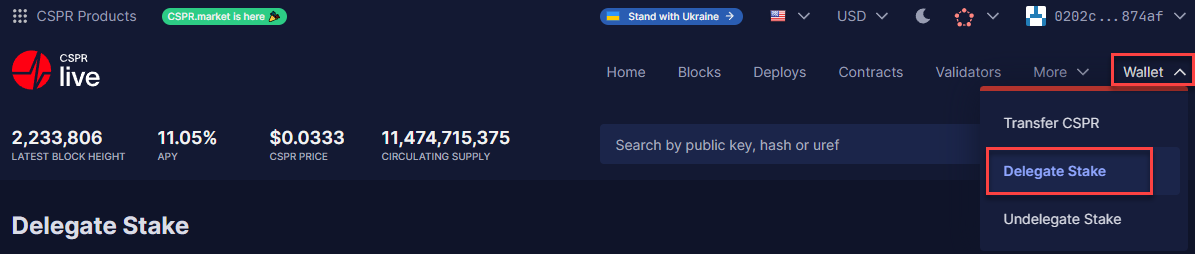
**Step 1:** Hover over '**Wallet**' in the top right corner and select '**Delegate Stake**'.

<figure><img src="https://3883897532-files.gitbook.io/~/files/v0/b/gitbook-x-prod.appspot.com/o/spaces%2F0mRE72CK4C3BU2yX3xxe%2Fuploads%2FkHywLWZnFS55cp0A90aJ%2FStep25.png?alt=media&amp;token=db1eb732-0f6a-43de-bd63-07323c7f16ec" alt=""><figcaption></figcaption></figure>

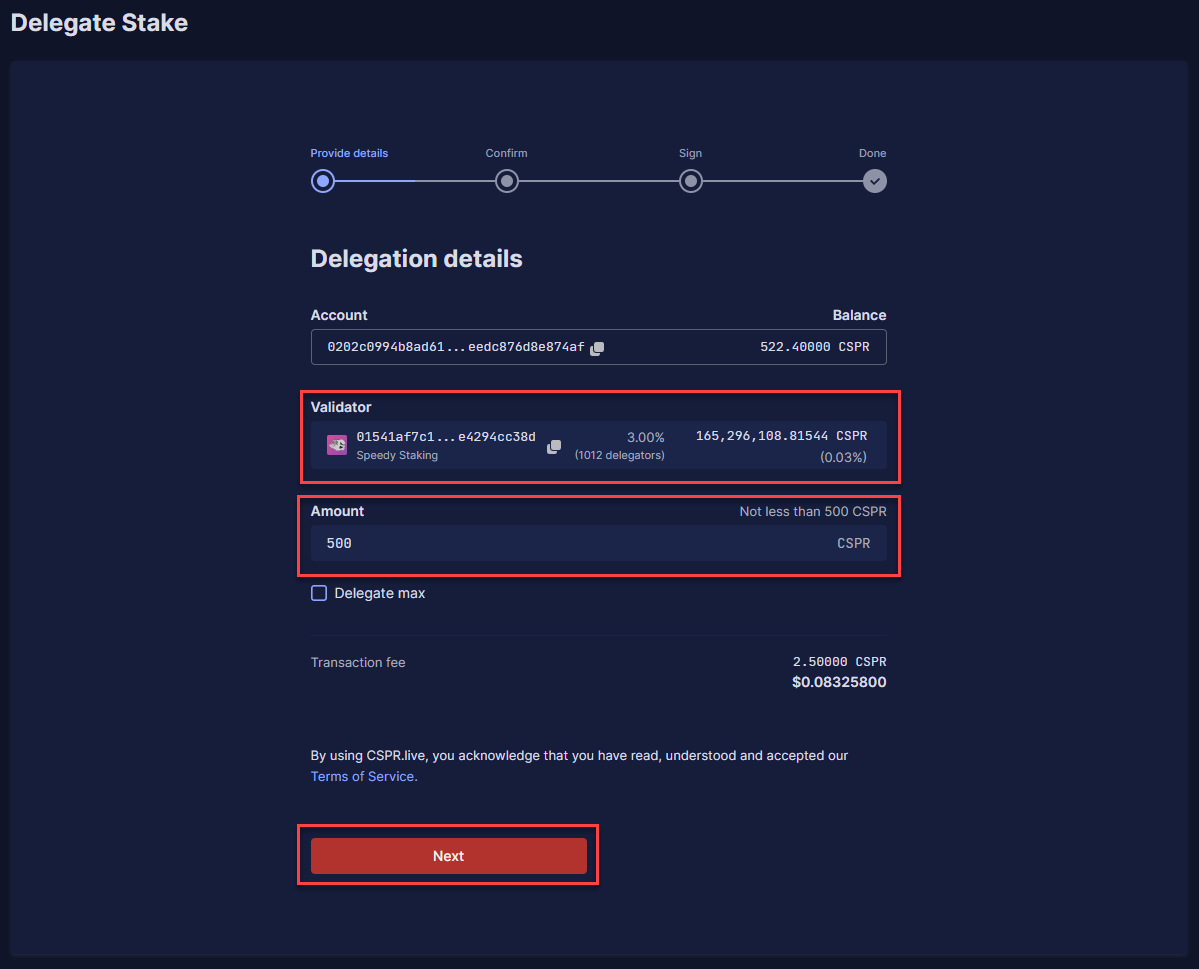
**Step 2:** Choose a validator under '**Validator**' (**For example, Speedy Staking**) and the amount of $CSPR you want to delegate under '**Amount**'. After this, click on '**Next**'.

<figure><img src="https://3883897532-files.gitbook.io/~/files/v0/b/gitbook-x-prod.appspot.com/o/spaces%2F0mRE72CK4C3BU2yX3xxe%2Fuploads%2FIKGR6mDuUDgxSDO63K9b%2FStep26.png?alt=media&amp;token=5e970f22-f62c-4109-8547-062d2f61aeab" alt=""><figcaption></figcaption></figure>

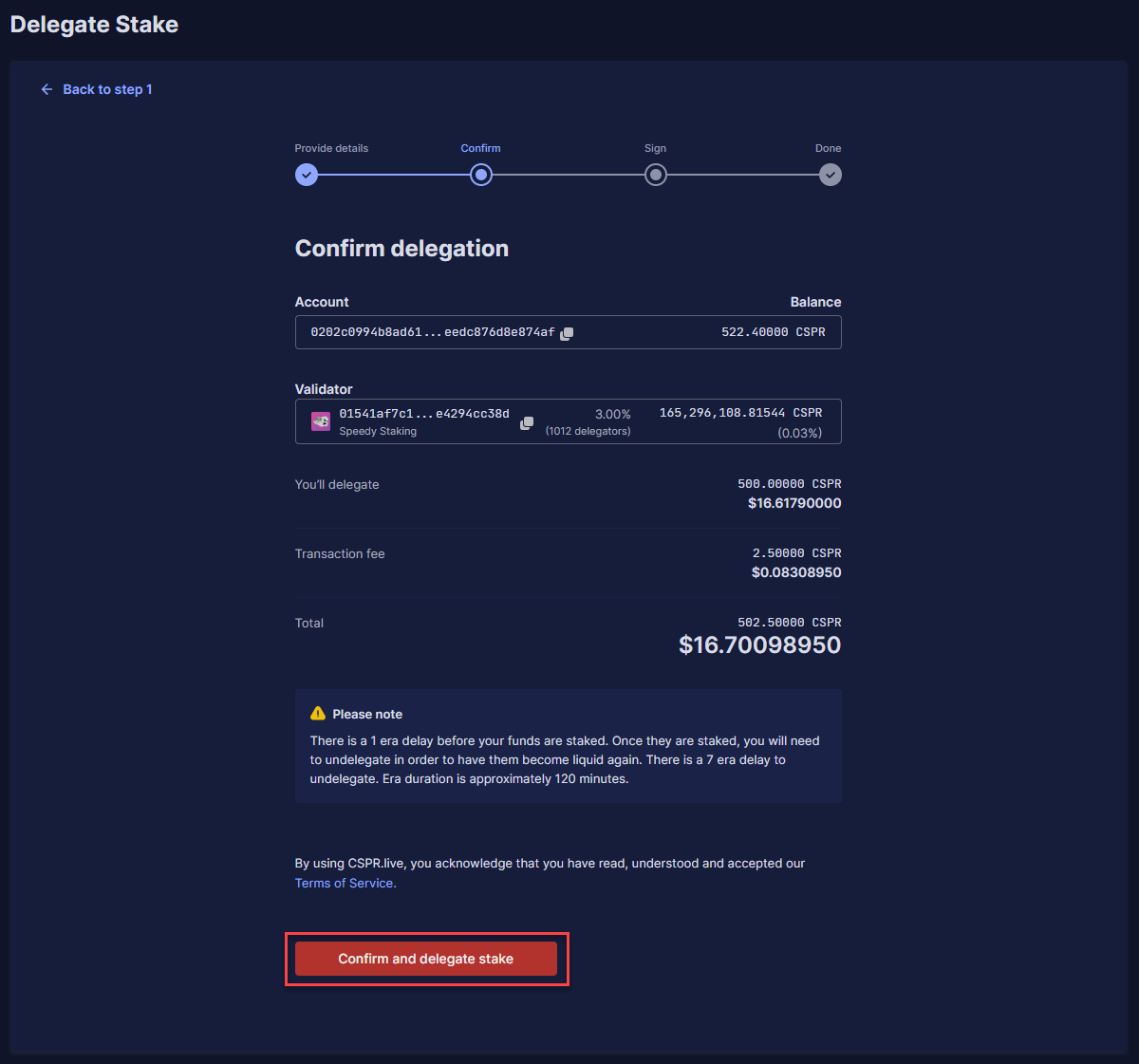
**Step 3:** Check if the information is correct and click '**Confirm and delegate stake**'.

<figure><img src="https://3883897532-files.gitbook.io/~/files/v0/b/gitbook-x-prod.appspot.com/o/spaces%2F0mRE72CK4C3BU2yX3xxe%2Fuploads%2F7eHjNNcA7bl6ITKte3sY%2FStep27.png?alt=media&amp;token=56aed044-e751-40bd-95a3-99d4b3039ed0" alt=""><figcaption></figcaption></figure>

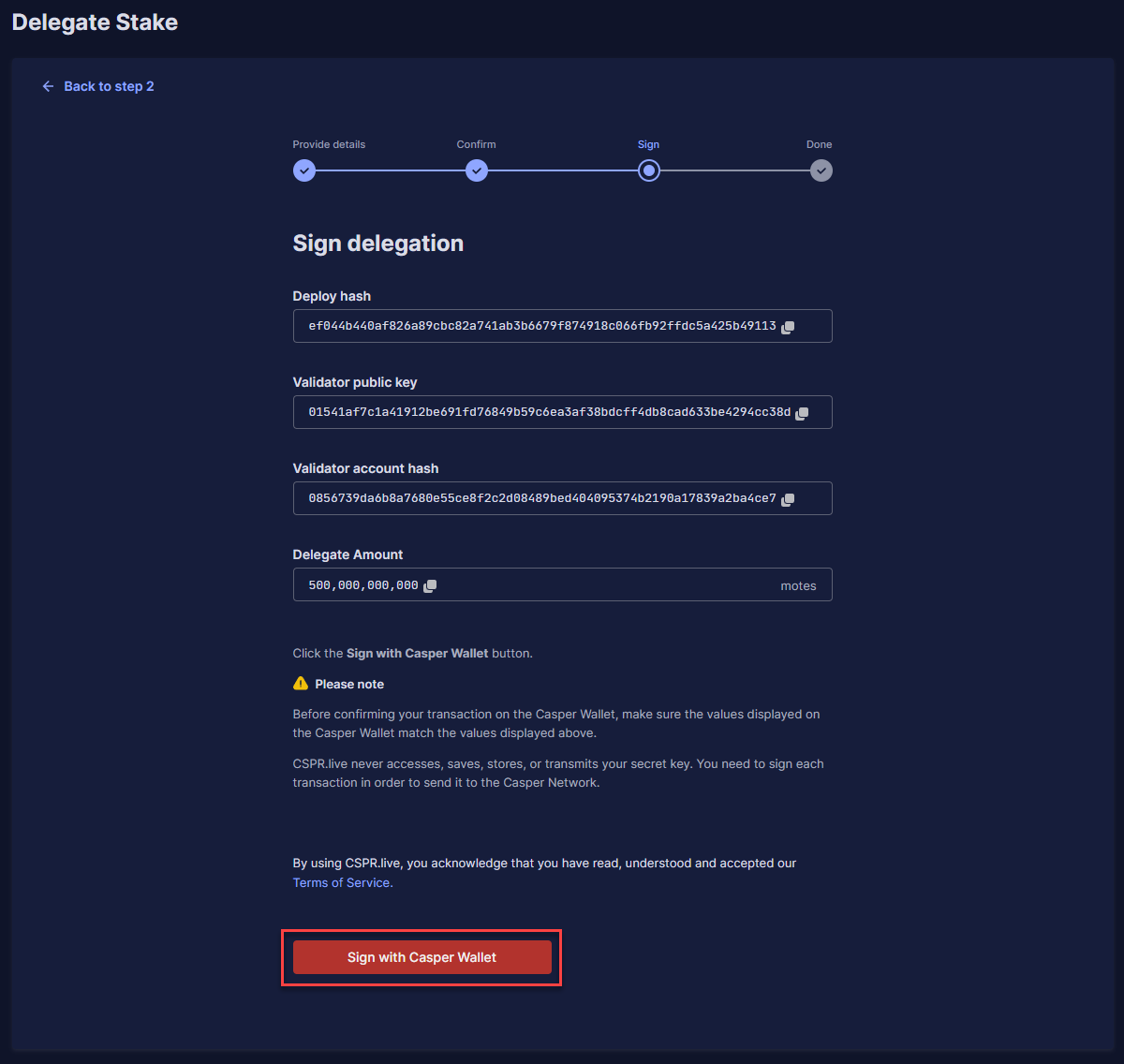
**Step 4:** It will now show you all the information about your transaction, and you can click '**Sign with Casper Wallet**'.

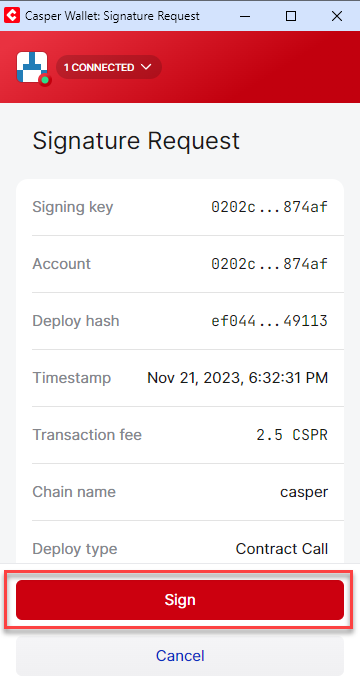
<figure><img src="https://3883897532-files.gitbook.io/~/files/v0/b/gitbook-x-prod.appspot.com/o/spaces%2F0mRE72CK4C3BU2yX3xxe%2Fuploads%2FctsuRtcxnNYiExOrWhqE%2FStep28.png?alt=media&amp;token=09879680-513e-49af-8d17-26216bdf89c4" alt=""><figcaption></figcaption></figure>

**Step 5:** Click on '**Sign**'.

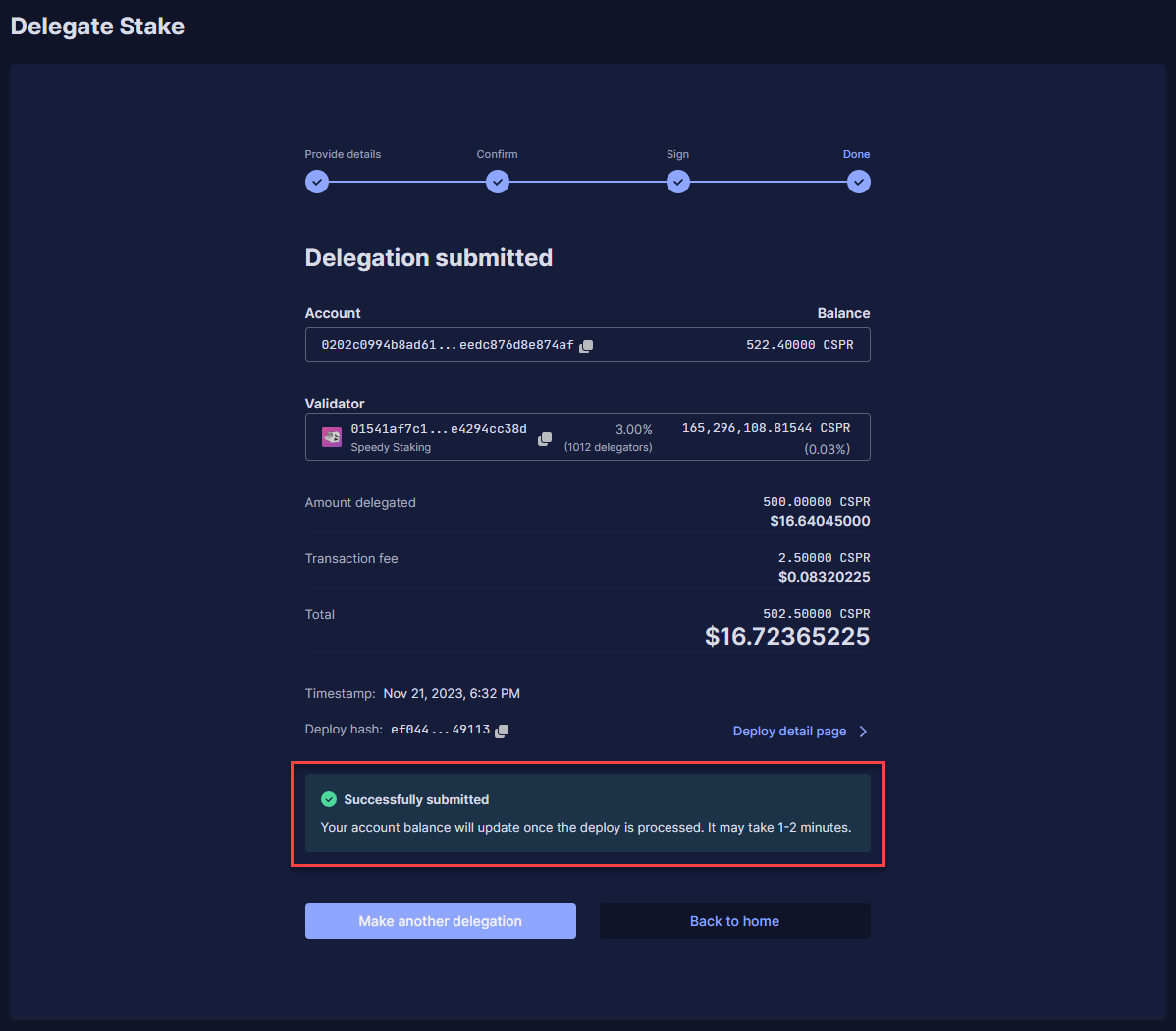
<figure><img src="https://3883897532-files.gitbook.io/~/files/v0/b/gitbook-x-prod.appspot.com/o/spaces%2F0mRE72CK4C3BU2yX3xxe%2Fuploads%2FpHpkZ53pwh7GCMHVR2fT%2FStep29.png?alt=media&amp;token=4e3a1d4e-3c25-4e72-9172-3050f6073ca4" alt=""><figcaption></figcaption></figure>

**Step 6:** You will see the details of the successful delegation. You will start receiving Staking Rewards after \~4 hours. You will then receive Staking Rewards every ERA (\~2 hours).