> For the complete documentation index, see [llms.txt](https://docs.speedystaking.io/llms.txt). Markdown versions of documentation pages are available by appending `.md` to page URLs; this page is available as [Markdown](https://docs.speedystaking.io/nl/casper-netwerk/casper-wallet/casper-wallet-verstuur-usdcspr-cspr.live.md).

# Casper Wallet - Verstuur $CSPR (CSPR.live)

<figure><img src="https://417746289-files.gitbook.io/~/files/v0/b/gitbook-x-prod.appspot.com/o/spaces%2FfcGyJ1C47hcV3dV9rYfW%2Fuploads%2FULbUWhpNbfuCLDBpxd9c%2FStep19.png?alt=media&amp;token=139e6999-b69f-4502-a00e-bc121dfe42f3" alt=""><figcaption></figcaption></figure>

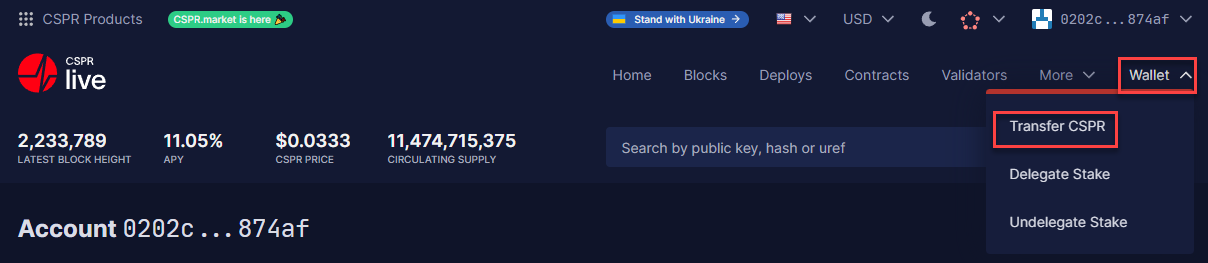
**Stap 1:** Beweeg je muis over '**Wallet**' aan de rechterbovenkant van je scherm en selecteer '**Transfer CSPR**'.

<figure><img src="https://417746289-files.gitbook.io/~/files/v0/b/gitbook-x-prod.appspot.com/o/spaces%2FfcGyJ1C47hcV3dV9rYfW%2Fuploads%2F7KWrtP1UbfXdehAyNqrE%2FStep20.png?alt=media&amp;token=08730ae1-6ce3-4642-9612-5930b621a5aa" alt=""><figcaption></figcaption></figure>

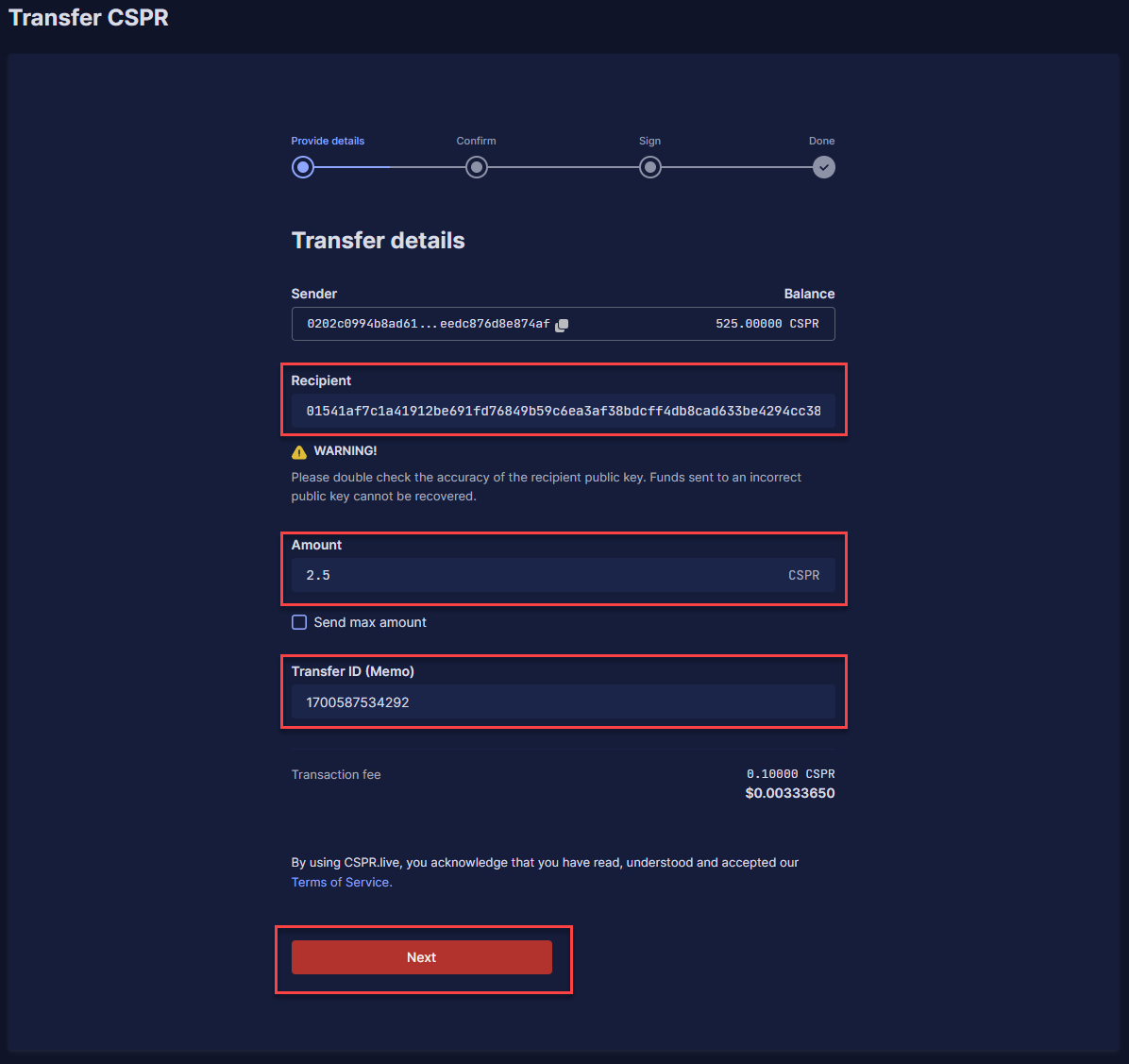
**Stap 2:** Vul de public key in waar je $CSPR naar toe wilt sturen onder '**Recipient**', de hoeveelheid $CSPR onder '**Amount**' en vul een specifieke Transfer ID in als dat nodig is onder '**Transfer ID (Memo)**'. Dit laatste is soms nodig als je $CSPR naar een exchange stuurt. Als dit niet nodig is kun je '**0**' invullen. Klik hierna op '**Next**'.

<figure><img src="https://417746289-files.gitbook.io/~/files/v0/b/gitbook-x-prod.appspot.com/o/spaces%2FfcGyJ1C47hcV3dV9rYfW%2Fuploads%2FoVCiSNZni27244I5dpnm%2FStep21.png?alt=media&amp;token=dcee48cf-5704-42d7-99de-b1f48f0afc37" alt=""><figcaption></figcaption></figure>

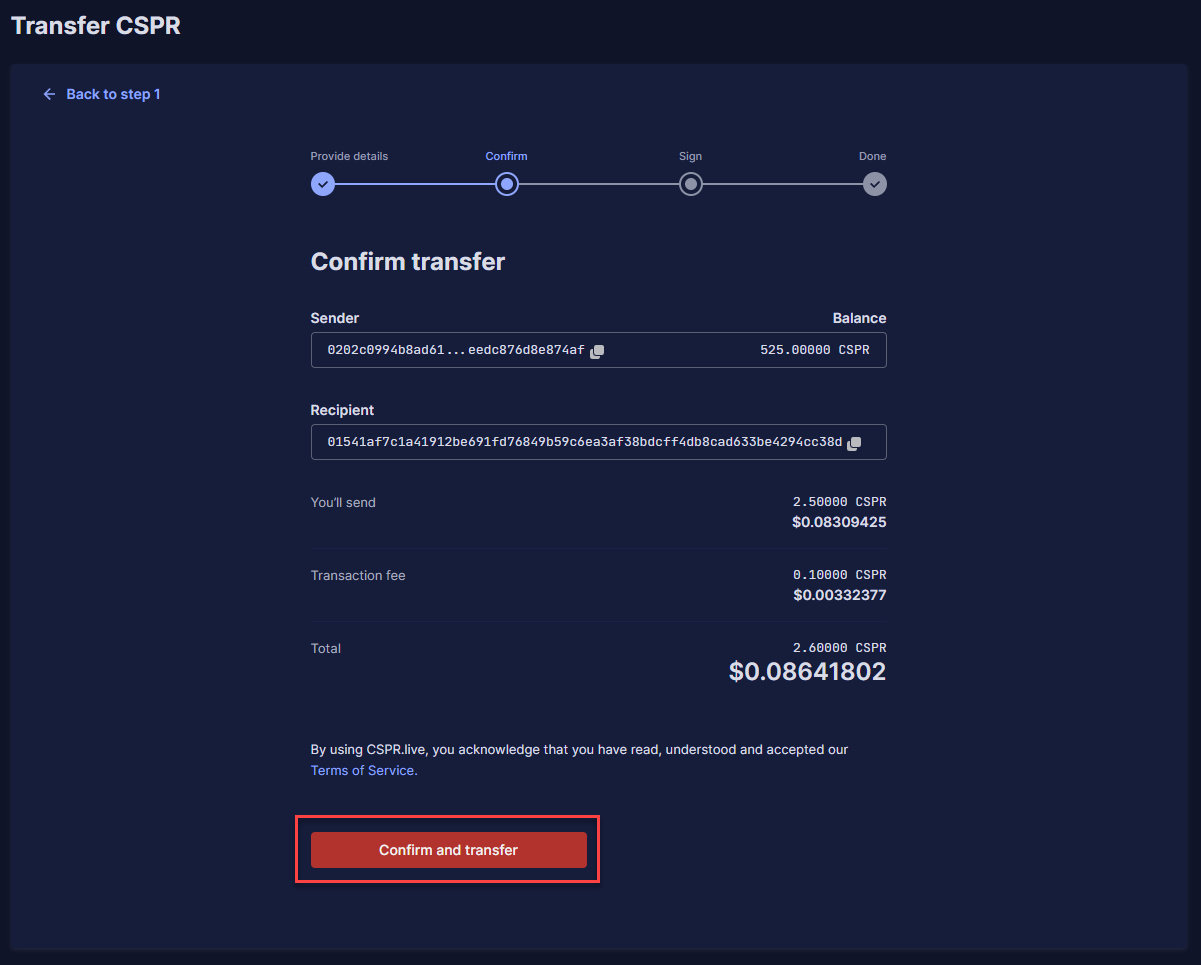
**Stap 3:** Controleer of de informatie correct is en klik op '**Confirm and transfer**'.

<figure><img src="https://417746289-files.gitbook.io/~/files/v0/b/gitbook-x-prod.appspot.com/o/spaces%2FfcGyJ1C47hcV3dV9rYfW%2Fuploads%2FHQvf0XdFCJW7vPQiDZaR%2FStep22-1.png?alt=media&amp;token=b7345774-9c28-483c-b696-6ea9c43dd802" alt=""><figcaption></figcaption></figure>

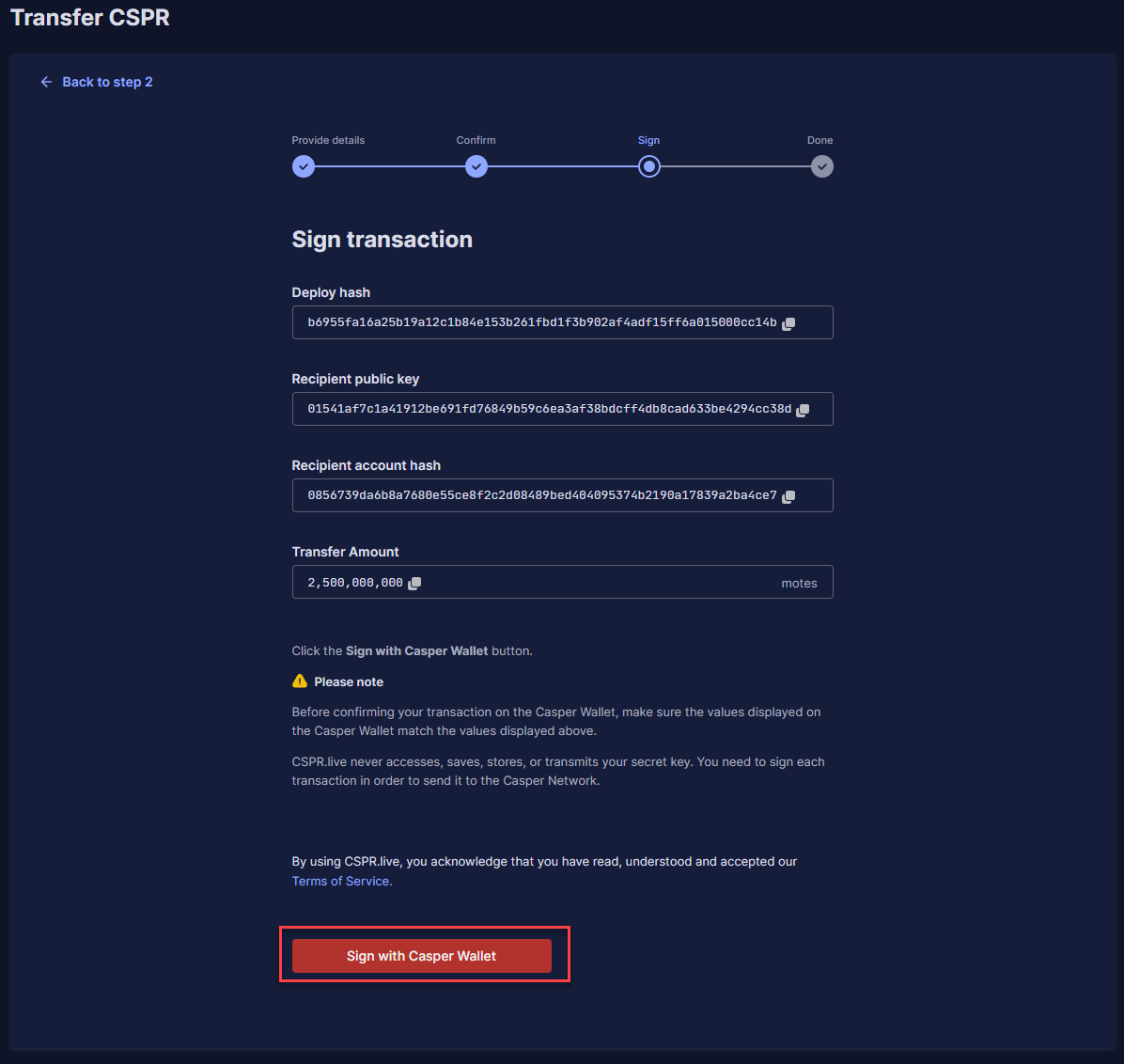
**Stap 4:** Je zult nu alle informatie over je transactie zien en je kunt op '**Sign with Casper Wallet**' klikken.

<figure><img src="https://417746289-files.gitbook.io/~/files/v0/b/gitbook-x-prod.appspot.com/o/spaces%2FfcGyJ1C47hcV3dV9rYfW%2Fuploads%2F4lH840VGc6XVWuDJgVzE%2FStep22.png?alt=media&amp;token=43c9ff1e-9aa0-47e5-9dd3-e3fc5f05ae1c" alt=""><figcaption></figcaption></figure>

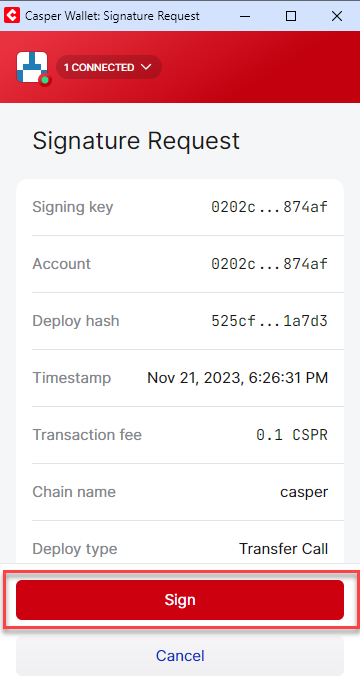
**Stap 5:** Klik op '**Sign**' in de Casper Wallet extensie popup.

<figure><img src="https://417746289-files.gitbook.io/~/files/v0/b/gitbook-x-prod.appspot.com/o/spaces%2FfcGyJ1C47hcV3dV9rYfW%2Fuploads%2FqVK55nx3oFC1es3MnTRU%2FStep23.png?alt=media&amp;token=4c1830e3-4313-49d3-92b9-be325fd75af0" alt=""><figcaption></figcaption></figure>

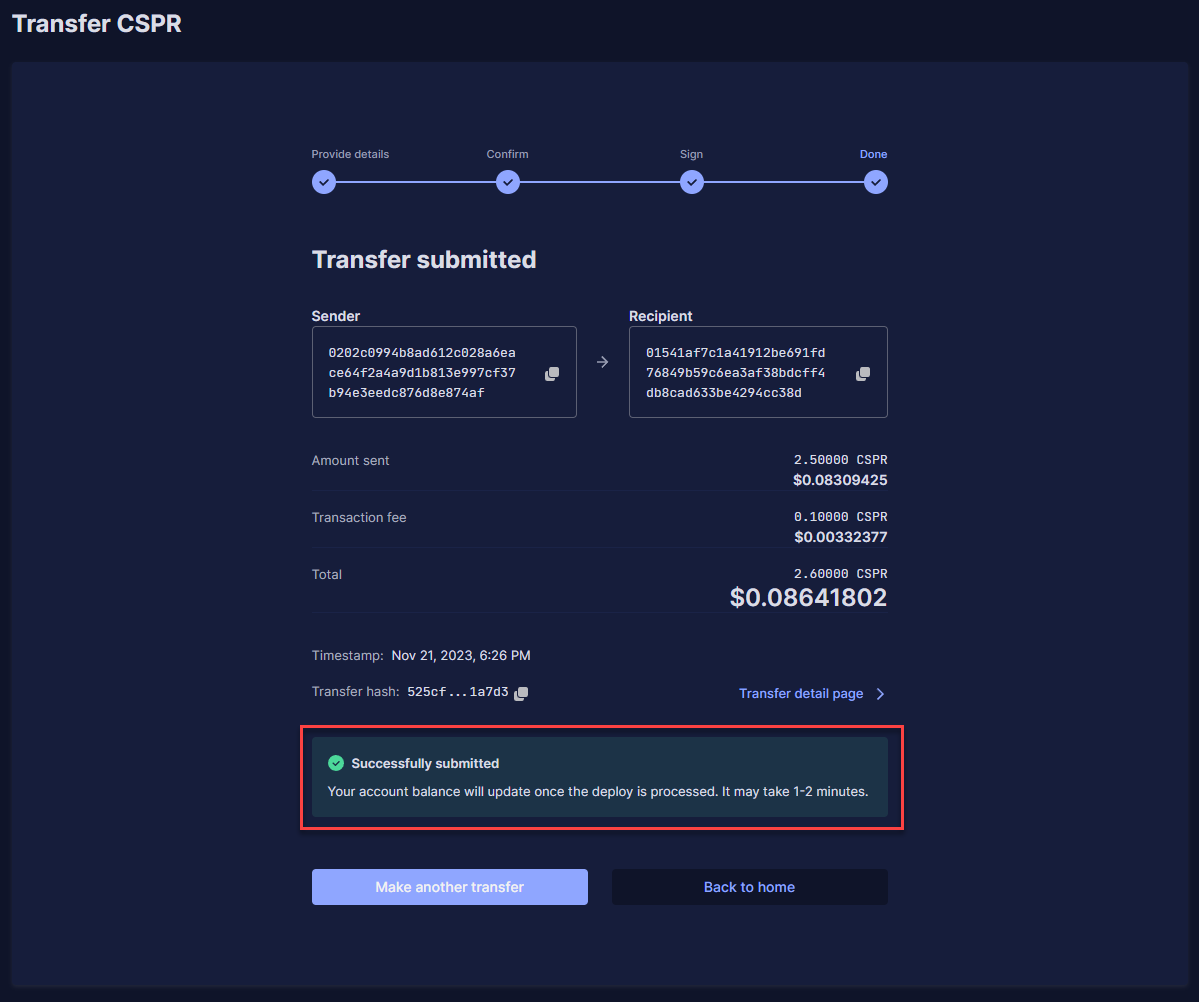
**Stap 6:** Je ziet nu de details van je succesvolle transactie.