> For the complete documentation index, see [llms.txt](https://docs.speedystaking.io/llms.txt). Markdown versions of documentation pages are available by appending `.md` to page URLs; this page is available as [Markdown](https://docs.speedystaking.io/tr/casper-network/casper-wallet/casper-wallet-transfer-usdcspr-cspr.live.md).

# Casper Wallet - Transfer $CSPR (CSPR.live)

<figure><img src="https://1412567319-files.gitbook.io/~/files/v0/b/gitbook-x-prod.appspot.com/o/spaces%2FxESvYIdbMVmqcDZ1mVuu%2Fuploads%2Fs6yVItBatfofYWKRHuKr%2FStep19.png?alt=media&amp;token=dfad07c4-cf5f-49eb-bc5f-7abbb5c490da" alt=""><figcaption></figcaption></figure>

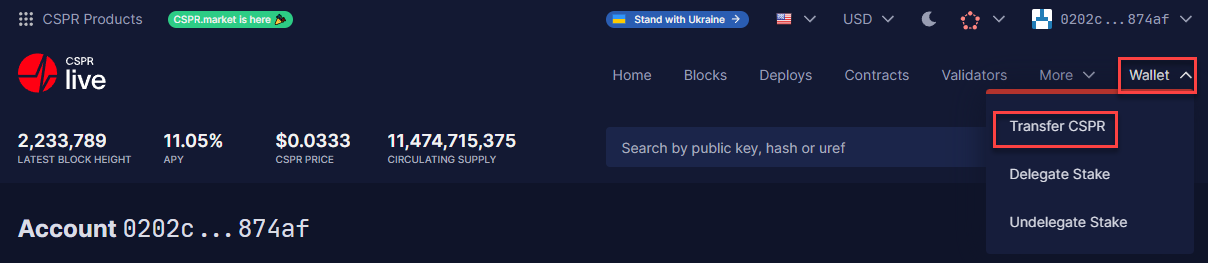
**Adım 1:** Sağ üst köşedeki 'Wallet'ın üzerine gelin ve 'CSPR Transfer'ı seçin.

<figure><img src="https://1412567319-files.gitbook.io/~/files/v0/b/gitbook-x-prod.appspot.com/o/spaces%2FxESvYIdbMVmqcDZ1mVuu%2Fuploads%2FegtW29f7fQgseFborSjR%2FStep20.png?alt=media&amp;token=7cfe4ae8-a3f1-49c1-b6cb-87df8f3facfb" alt=""><figcaption></figcaption></figure>

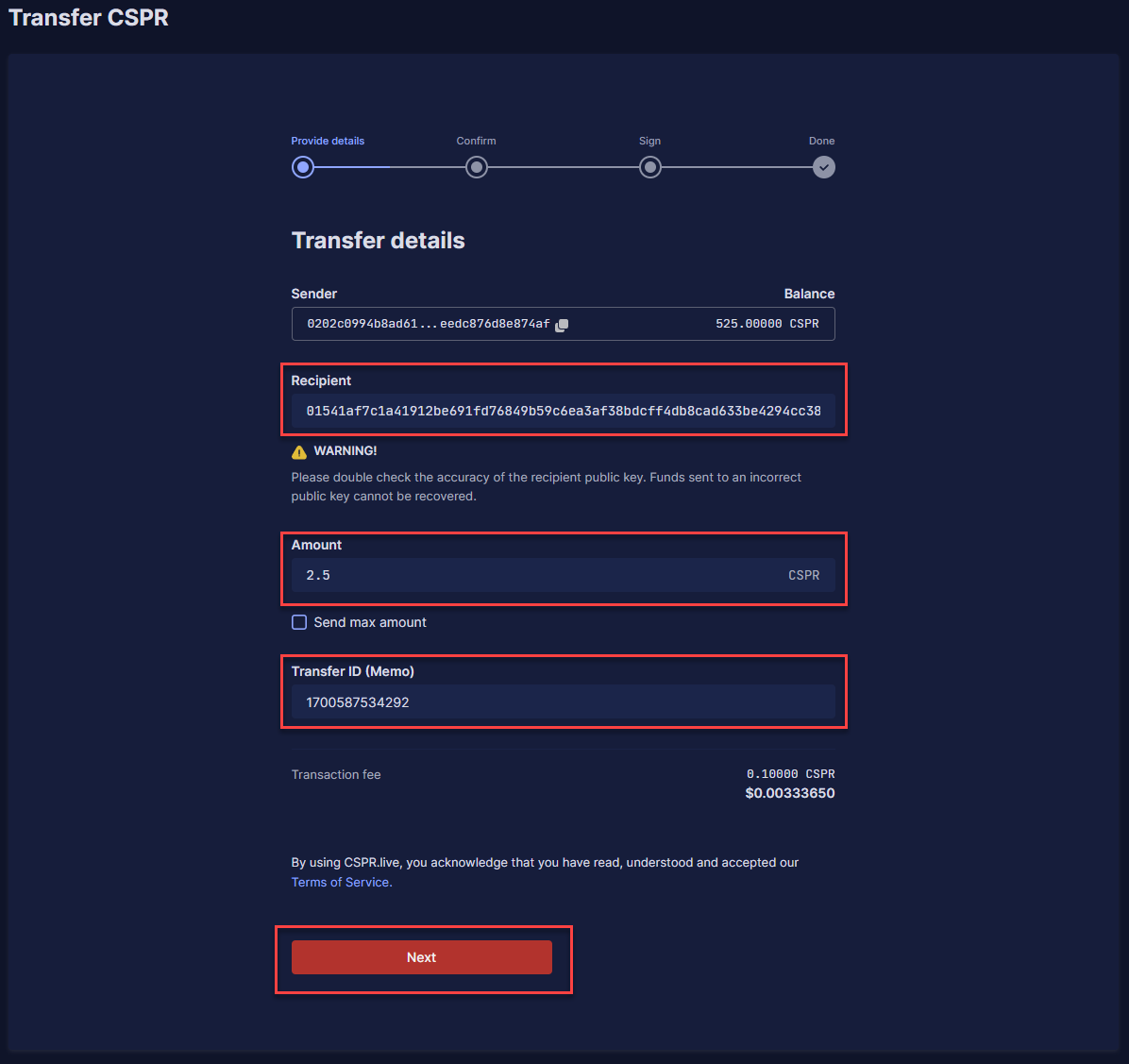
**Adım 2:** $CSPR'nizi göndermek istediğiniz yerin açık anahtarını '**Recipient**' , göndermek istediğiniz $CSPR miktarını '**Amount**' ve '**Transfer ID (Memo)**' altında isterseniz/ihtiyaç duyarsanız belirli bir Transfer ID doldurun. Bir borsaya $CSPR gönderiyorsanız bu bazen gereklidir. Gerekmiyorsa, '**0**' kullanabilirsiniz. Bundan sonra, '**Next**' seçeneğine tıklayın.

<figure><img src="https://1412567319-files.gitbook.io/~/files/v0/b/gitbook-x-prod.appspot.com/o/spaces%2FxESvYIdbMVmqcDZ1mVuu%2Fuploads%2FcILm2OCFW3gaed1Fvo8Y%2FStep21.png?alt=media&amp;token=a607ef49-427e-4471-964a-8cdf2d757f4c" alt=""><figcaption></figcaption></figure>

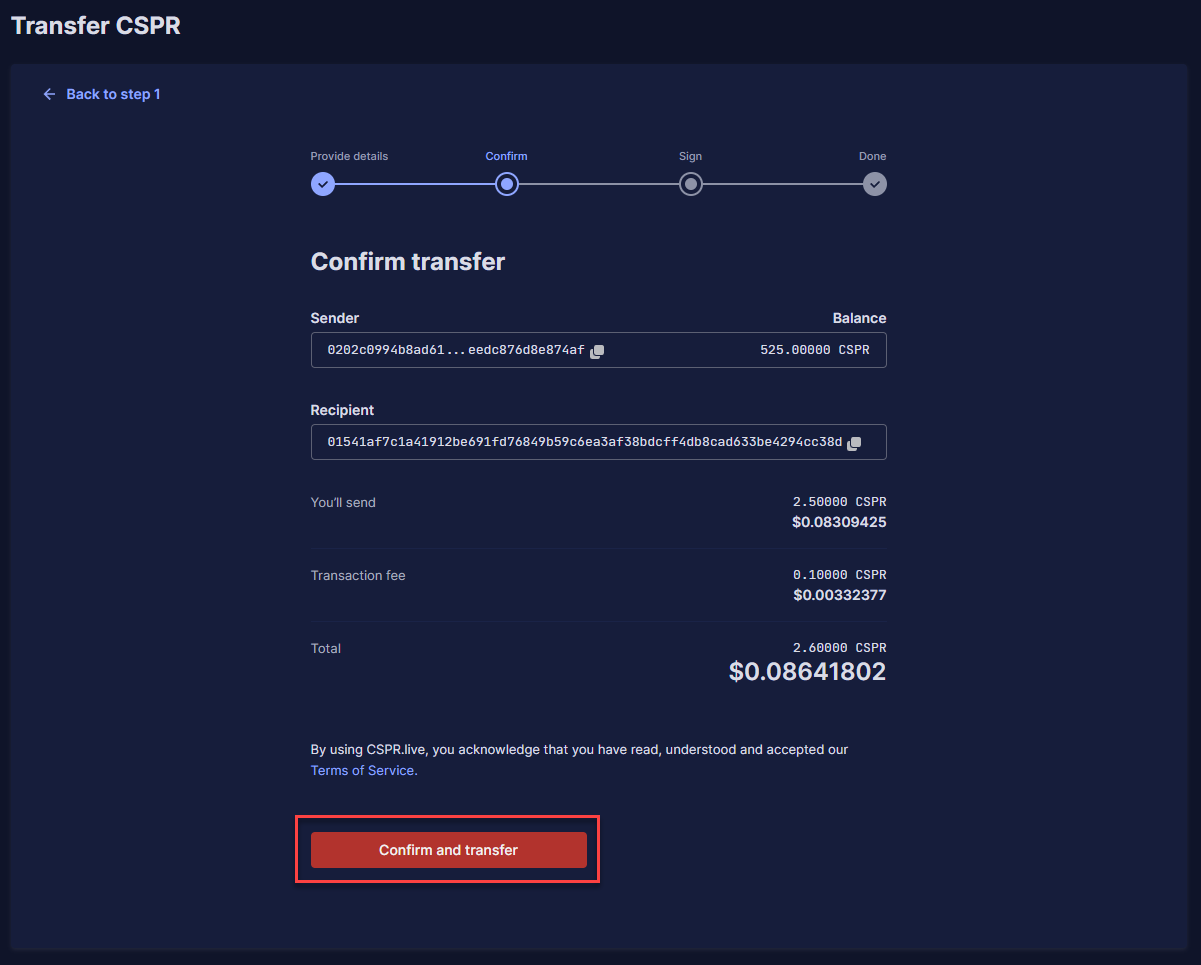
**Adım 3:** Bilgilerin doğru olup olmadığını kontrol edin ve '**Confirm and transfer**' butonuna tıklayın.

<figure><img src="https://1412567319-files.gitbook.io/~/files/v0/b/gitbook-x-prod.appspot.com/o/spaces%2FxESvYIdbMVmqcDZ1mVuu%2Fuploads%2FdGaWCFlgKA6be5LNKU68%2FStep22-1.png?alt=media&amp;token=50546bad-a5be-479c-8ace-18d6096aa652" alt=""><figcaption></figcaption></figure>

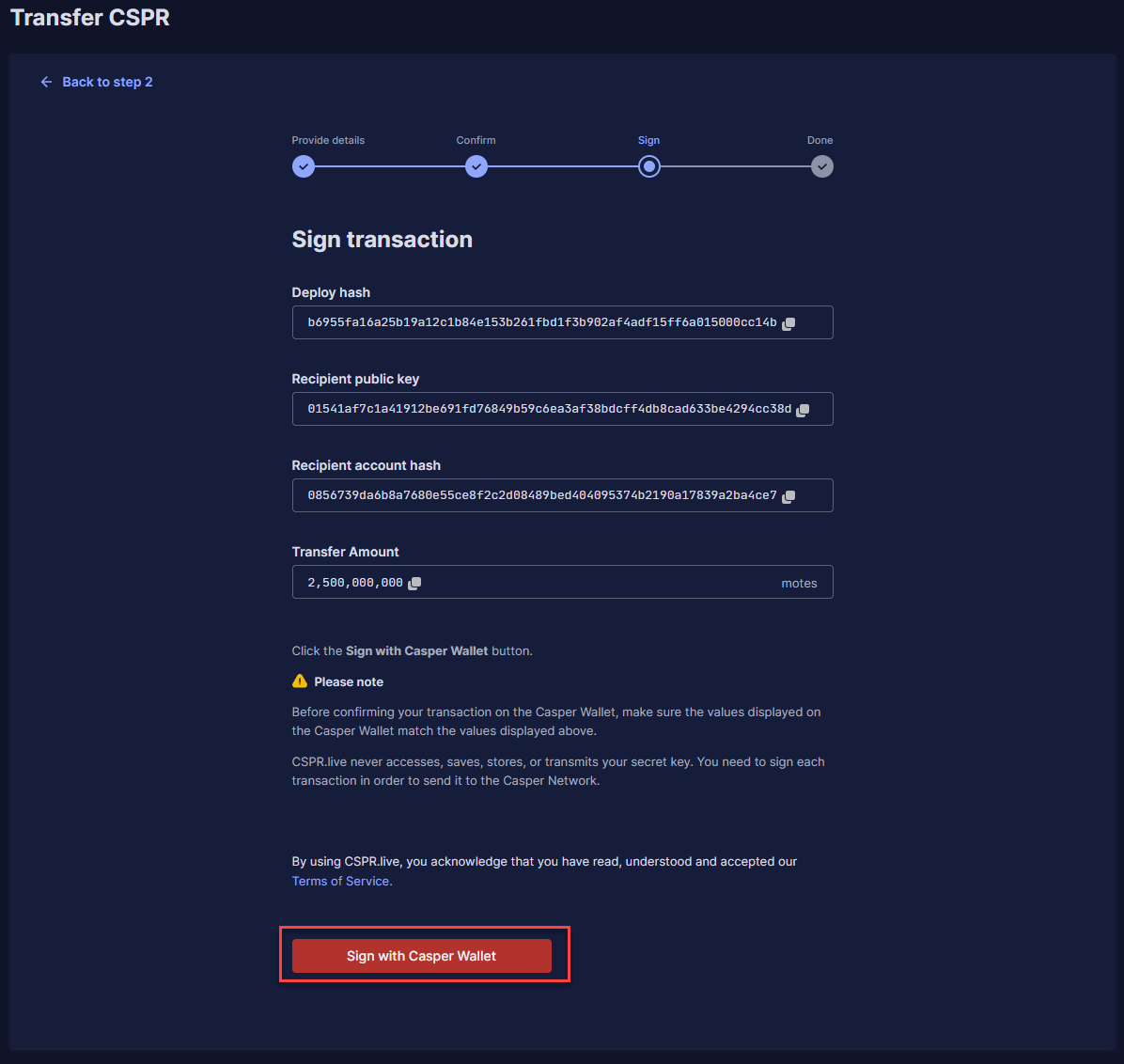
**Adım 4:** Şimdi size işleminizle ilgili tüm bilgileri gösterecek ve '**Sign with Casper Wallet**' seçeneğine tıklayabilirsiniz.

<figure><img src="https://1412567319-files.gitbook.io/~/files/v0/b/gitbook-x-prod.appspot.com/o/spaces%2FxESvYIdbMVmqcDZ1mVuu%2Fuploads%2FhDfDuZZMguUph2AwRciZ%2FStep22.png?alt=media&amp;token=67c56e8d-a76e-4c89-84c7-ba9e5a8c2ab5" alt=""><figcaption></figcaption></figure>

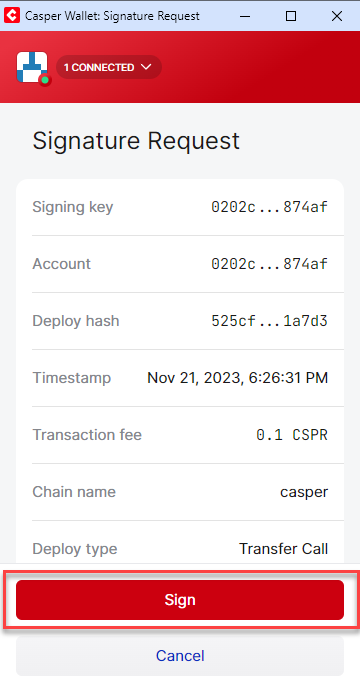
**Adım 5:** Casper Cüzdan uzantısı isteminde '**Sign**' üzerine tıklayın.

<figure><img src="https://1412567319-files.gitbook.io/~/files/v0/b/gitbook-x-prod.appspot.com/o/spaces%2FxESvYIdbMVmqcDZ1mVuu%2Fuploads%2FEfgnOGkWeqSkB15G84Rt%2FStep23.png?alt=media&amp;token=81c07883-646f-43e9-81fd-9c93fa2295aa" alt=""><figcaption></figcaption></figure>

**Adım 6:** Başarılı aktarımın ayrıntılarını göreceksiniz.