> For the complete documentation index, see [llms.txt](https://docs.speedystaking.io/llms.txt). Markdown versions of documentation pages are available by appending `.md` to page URLs; this page is available as [Markdown](https://docs.speedystaking.io/tr/casper-network/metamask/metamask-kurulum.md).
# MetaMask - Kurulum
**Adım 1:** Henüz yapmadıysanız bir MetaMask cüzdanı kurun ve ayarlayın: [**BURAYA TIKLAYIN**](https://metamask.io/download/)
**Adım 2:** '**Add to MetaMask**' seçeneğine tıklayarak Casper MetaMask Snap'i yükleyin: [**BURAYA TIKLAYIN**](https://snaps.metamask.io/snap/npm/casper-manager/)
**Adım 3:** MetaMask uzantısı isteminde '**Accept**' üzerine tıklayın.
**Adım 4:** MetaMask uzantısında '**Connect**' üzerine tıklayın.
**Adım 5:** MetaMask uzantısındaki '**Install**' seçeneğine tıklayın.
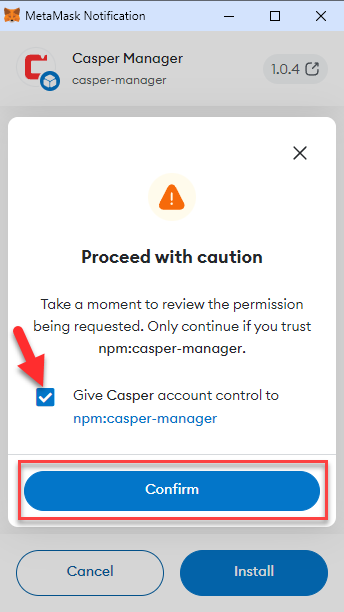
**Adım 6:** Onay kutusunu işaretleyin ve MetaMask uzantısındaki '**Confirm**' seçeneğine tıklayın.
**Adım 7:** Yükleme tamamlandıktan sonra MetaMask uzantısındaki '**OK**' seçeneğine tıklayın.